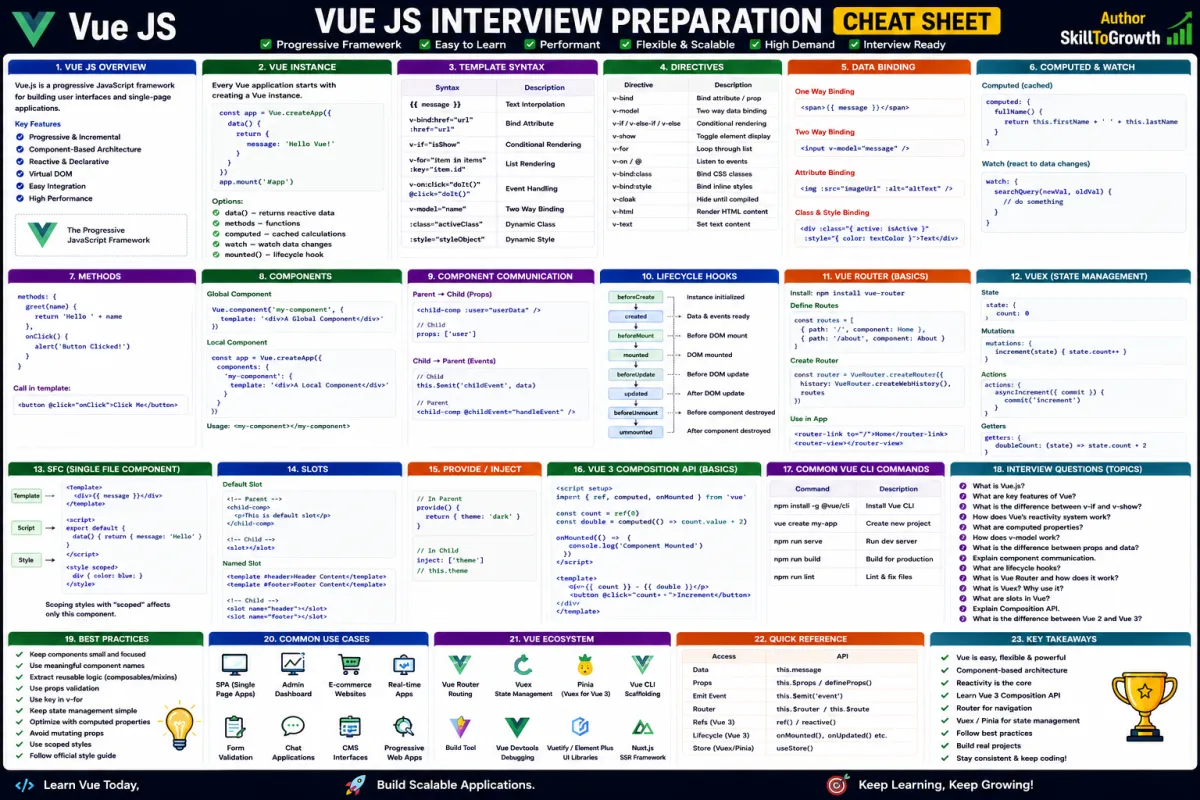
Vue Composition API: Understanding setup(), ref(), reactive(), computed(), watch(), provide(), inject(), Lifecycle Hooks & Composables
Vue Composition API: Understanding setup(), ref(), reactive(), computed(), watch(), provide(), inject(), Lifecycle Hooks & Composables
SkilltoGrowth Expert
Published on July 31, 2026As Vue.js applications grow in size and complexity, organizing code becomes increasingly important. Small applications can often manage all their logic inside a single component, but enterprise applications may contain hundreds of components, complex business rules, multiple API integrations, and shared application state. Managing all of this using traditional component options can quickly become difficult.
To address these challenges, Vue 3 introduced the Composition API, a modern and flexible way to organize component logic. Instead of separating code based on component options such as data, methods, computed properties, and lifecycle hooks, the Composition API allows developers to organize code based on features or business functionality.
Imagine you're building an e-commerce platform. A product page may include product details, reviews, inventory status, wishlist functionality, pricing calculations, API requests, user authentication, and shopping cart management. With the traditional Options API, this logic is scattered across multiple sections of the component. Using the Composition API, all related functionality can be grouped together, making the code easier to understand, maintain, and reuse.
The Composition API is now the recommended approach for building modern Vue applications. It integrates seamlessly with TypeScript, improves code organization, supports reusable business logic, and simplifies the development of large-scale applications.
In this chapter, you'll learn what the Composition API is, understand the purpose of setup(), explore ref(), reactive(), computed(), watch(), provide(), inject(), lifecycle hooks, composables, and discover the best practices for writing clean and scalable Vue applications.
Why the Composition API Is Important
As applications evolve, components often become larger and more difficult to maintain.
The Composition API solves this problem by allowing developers to group related functionality together instead of separating code by its type.
Some major advantages include:
🔸 Better code organization
🔸 Improved code reusability
🔸 Easier maintenance
🔸 Better TypeScript support
🔸 Cleaner business logic
🔸 Simplified testing
🔸 Better scalability
🔸 Improved developer productivity
For modern enterprise applications, the Composition API has become the preferred approach for organizing Vue components.
What is the Composition API?
The Composition API is a programming approach introduced in Vue 3 that allows developers to organize component logic based on functionality rather than predefined component sections.
Instead of separating data, methods, watchers, and lifecycle hooks into different parts of a component, developers group everything related to a particular feature together.
For example, an authentication feature may include:
- User information
- Login status
- Authentication methods
- API requests
- Session management
- Validation logic
Rather than scattering this code throughout the component, the Composition API keeps everything together, making it easier to read and maintain.
This approach becomes particularly valuable as applications grow in size.
Understanding setup()
The setup() function is the entry point of the Composition API.
It is the first function executed when a component is created and serves as the place where developers initialize reactive data, computed properties, watchers, lifecycle hooks, and reusable business logic.
Think of setup() as the central workspace for the component.
Inside setup(), developers define everything the component needs before it becomes available to the user interface.
The setup() function provides several important benefits:
🔸 Centralized component logic
🔸 Better organization
🔸 Easier integration with composables
🔸 Improved readability
🔸 Better support for reusable code
Almost every Composition API component begins with setup().
Understanding ref()
The ref() function creates a reactive reference for a single value.
Whenever the value changes, Vue automatically updates every part of the application that depends on it.
Developers commonly use ref() for managing individual values such as:
🔸 User names
🔸 Login status
🔸 Search text
🔸 Notification count
🔸 Loading indicators
🔸 Selected category
🔸 Theme mode
🔸 Form fields
Because ref() is lightweight and easy to understand, it is one of the most frequently used Composition API features.
It works particularly well with primitive values such as strings, numbers, and Boolean values.
Understanding reactive()
While ref() manages individual values, reactive() is designed for handling complete objects.
Most real-world applications work with structured data rather than isolated variables.
Examples include:
🔸 Customer profiles
🔸 Product information
🔸 Shopping carts
🔸 Employee records
🔸 Dashboard statistics
🔸 Order details
🔸 Settings
🔸 User preferences
Instead of creating multiple individual reactive variables, developers can make an entire object reactive using reactive().
Whenever any property changes, Vue automatically updates the relevant parts of the user interface.
Using reactive() simplifies state management for complex business data.
Understanding computed()
Applications often display values calculated from existing data.
Examples include:
- Total shopping cart value
- Discounted prices
- Full customer name
- Product availability
- Filtered search results
- Tax calculations
Instead of repeatedly calculating these values throughout the application, Vue provides computed().
Computed properties automatically calculate values based on reactive data and cache the result until one of their dependencies changes.
This improves performance because unnecessary calculations are avoided.
Computed properties also keep templates clean by moving calculation logic out of the user interface.
Whenever displayed information depends on other reactive values, computed() is usually the best solution.
Understanding watch()
Sometimes applications need to perform additional actions whenever data changes.
For example:
- Calling an API
- Saving settings
- Updating local storage
- Triggering notifications
- Sending analytics
- Performing validation
These actions involve side effects rather than simply displaying information.
Vue provides watch() for these situations.
Watch observes specific reactive values and executes custom logic whenever those values change.
Unlike computed(), which returns calculated data, watch() focuses on reacting to changes.
This makes it especially useful for integrating external systems or performing asynchronous operations.
Understanding provide()
Large applications often contain deeply nested component structures.
Passing the same information through every intermediate component can quickly become repetitive and difficult to maintain.
Vue solves this problem with provide().
The provide() function allows a parent component to make data available to all descendant components without passing it manually through every level.
This technique is commonly used for:
🔸 Theme settings
🔸 Authentication state
🔸 Configuration data
🔸 Localization
🔸 Shared services
🔸 Application settings
By reducing unnecessary property passing, provide() simplifies large component hierarchies.
Understanding inject()
The inject() function works together with provide().
While provide() makes information available, inject() allows descendant components to access that shared data.
This communication mechanism is particularly useful when components several levels apart need access to the same information.
Examples include:
🔸 User preferences
🔸 Application configuration
🔸 Language settings
🔸 Authentication services
🔸 Shared utilities
🔸 Theme configuration
Using provide() and inject() together reduces unnecessary complexity while keeping components loosely coupled.
Lifecycle Hooks
Every Vue component passes through several stages during its lifetime.
It is created, displayed, updated as data changes, and eventually removed from the application.
The Composition API provides Lifecycle Hooks that allow developers to execute specific logic during these stages.
Lifecycle hooks are commonly used for:
🔸 Loading API data
🔸 Registering event listeners
🔸 Starting timers
🔸 Initializing third-party libraries
🔸 Cleaning resources
🔸 Saving application state
By placing code in the appropriate lifecycle hook, developers ensure that operations occur at the correct moment during component execution.
This improves both reliability and application performance.
Understanding Composables
One of the biggest strengths of the Composition API is the ability to create Composables.
A composable is a reusable function that contains reactive business logic.
Instead of duplicating the same code across multiple components, developers create composables that can be shared throughout the application.
Examples include:
🔸 User authentication
🔸 API communication
🔸 Shopping cart management
🔸 Theme switching
🔸 Form validation
🔸 Notification handling
🔸 Geolocation
🔸 Pagination
Composables improve code reuse while keeping components small and focused.
As applications grow, they become one of the most valuable features of the Composition API.
When Should You Use the Composition API?
Although Vue still supports the traditional Options API, the Composition API is generally preferred for medium and large applications.
It is particularly beneficial when:
🔸 Components contain complex business logic.
🔸 Logic needs to be reused across multiple components.
🔸 The project uses TypeScript.
🔸 Teams work on enterprise-scale applications.
🔸 Features need to be organized independently.
For very small applications, the Options API may still be sufficient, but the Composition API offers greater flexibility as projects grow.
Composition API Best Practices
Following consistent development practices helps maintain clean and scalable Vue applications.
Recommended Practices
🔸 Organize code by feature rather than by option type.
🔸 Keep setup() clean and focused.
🔸 Use ref() for primitive values.
🔸 Use reactive() for complex objects.
🔸 Prefer computed() for calculated values.
🔸 Use watch() only when side effects are required.
🔸 Extract reusable business logic into composables.
🔸 Avoid creating excessively large components.
🔸 Separate UI logic from business logic.
🔸 Follow consistent naming conventions across composables and components.
Common Mistakes
Developers transitioning from the Options API often make similar mistakes while learning the Composition API.
Common Mistakes
🔸 Using watch() when computed() is sufficient.
🔸 Mixing unrelated business logic inside setup().
🔸 Creating unnecessary reactive variables.
🔸 Writing oversized composables with multiple responsibilities.
🔸 Misusing provide() and inject() for simple parent-child communication.
🔸 Duplicating reusable logic instead of creating composables.
🔸 Ignoring proper project organization.
🔸 Mixing Composition API and Options API without a clear reason.
Recognizing these issues early helps developers build cleaner, more maintainable Vue applications.
Interview Questions
- What is the Vue Composition API?
- Why was the Composition API introduced in Vue 3?
- What is the purpose of the setup() function?
- What is the difference between ref() and reactive()?
- When should computed() be used instead of watch()?
- What are provide() and inject(), and when should they be used?
- What are lifecycle hooks in the Composition API?
- What are composables, and why are they important?
- How does the Composition API improve code organization?
What are the best practices for building scalable Vue applications using the Composition API?