JSX in React: Understanding JSX Syntax, Expressions, Fragments, Conditional Rendering & Rendering Lists
JSX in React: Understanding JSX Syntax, Expressions, Fragments, Conditional Rendering & Rendering Lists
SkilltoGrowth Expert
Published on July 31, 2026One of the first things developers notice when learning React is that HTML appears to be written directly inside JavaScript. This unique syntax is known as JSX (JavaScript XML). Although it may look like standard HTML, JSX is actually a syntax extension for JavaScript that allows developers to describe user interfaces in a simple, readable, and declarative way.
Before JSX was introduced, developers had to create HTML elements using plain JavaScript functions, which often resulted in lengthy and difficult-to-read code. JSX simplifies this process by allowing developers to write UI structures using HTML-like syntax while still taking advantage of JavaScript's flexibility.
Imagine you're building an online shopping application. Every product card contains an image, title, price, rating, availability status, and an "Add to Cart" button. Writing these elements using traditional JavaScript would require creating each element manually. With JSX, developers can describe the entire user interface in a clean and organized format, making applications easier to build and maintain.
Although JSX resembles HTML, there are important differences between the two. JSX follows JavaScript rules, supports dynamic expressions, allows conditional rendering, renders collections efficiently, and integrates seamlessly with React components.
Every React application relies heavily on JSX. Whether you're creating dashboards, blogs, e-commerce platforms, social media applications, or enterprise software, JSX provides the foundation for building reusable and interactive user interfaces.
In this chapter, you'll learn what JSX is, understand its syntax, explore expressions, rendering techniques, fragments, comments, conditional rendering, rendering lists, and the importance of keys in React.
Why JSX Is Important
JSX combines the power of JavaScript with the readability of HTML.
Instead of separating UI structure and application logic into different files, JSX allows developers to build user interfaces in one place.
Understanding JSX helps developers:
🔸 Write cleaner React components
🔸 Build reusable user interfaces
🔸 Reduce manual DOM manipulation
🔸 Improve code readability
🔸 Create dynamic web applications
🔸 Render data efficiently
🔸 Simplify component development
🔸 Improve application maintainability
Because every React component returns JSX, mastering it is essential before learning advanced React concepts.
Introduction to JSX
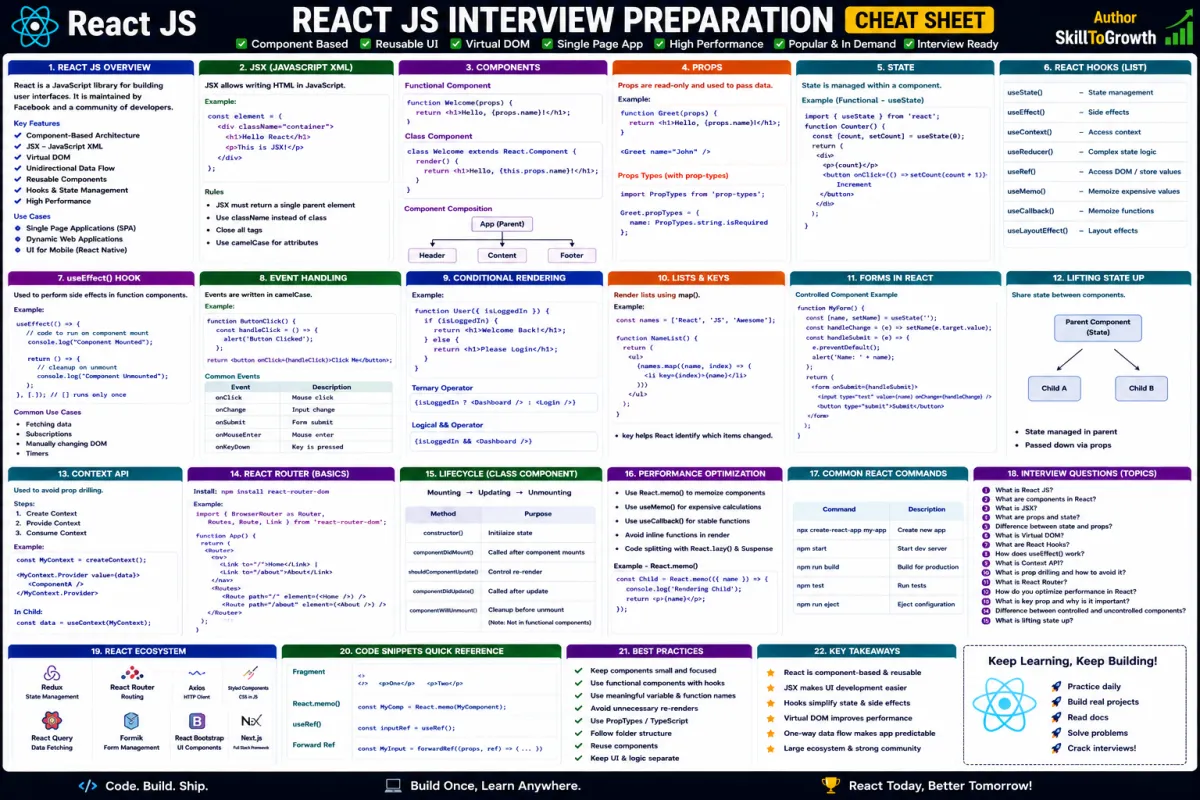
JSX stands for JavaScript XML.
It is a syntax extension that allows developers to write HTML-like code directly inside JavaScript.
Although browsers cannot understand JSX directly, React automatically converts it into standard JavaScript before the application runs.
Developers use JSX to describe what the user interface should look like instead of manually creating HTML elements through JavaScript.
For example, a product page may contain:
🔸 Product image
🔸 Product title
🔸 Product description
🔸 Product price
🔸 Customer ratings
🔸 Stock availability
🔸 Add to Cart button
🔸 Product reviews
Using JSX makes these interfaces much easier to understand than traditional DOM manipulation.
JSX Syntax
Although JSX looks very similar to HTML, it follows JavaScript syntax rules.
React interprets JSX as JavaScript expressions rather than plain HTML.
JSX allows developers to combine static markup with dynamic application data, making interfaces highly interactive.
Some important characteristics of JSX include:
🔸 HTML-like syntax
🔸 JavaScript expressions
🔸 Component integration
🔸 Dynamic attributes
🔸 Event handling
🔸 Nested elements
🔸 Reusable UI structures
Because JSX closely resembles HTML, developers with frontend experience usually learn it quickly.
Expressions in JSX
One of JSX's greatest strengths is the ability to embed JavaScript expressions directly inside the user interface.
Instead of displaying fixed values, React can render dynamic information based on application data.
Expressions are commonly used for:
🔸 User names
🔸 Product prices
🔸 Shopping cart totals
🔸 Notification counts
🔸 Dates and times
🔸 Mathematical calculations
🔸 Function results
🔸 Conditional values
Whenever application data changes, React automatically re-renders the affected parts of the interface.
This reactive behavior allows developers to build highly dynamic applications with minimal effort.
JSX Rules
Although JSX resembles HTML, it follows several important rules that developers must understand.
React components should always return valid JSX.
Some key JSX rules include:
🔸 Components must return a single parent element.
🔸 HTML attributes follow JavaScript naming conventions.
🔸 JavaScript expressions are written inside curly braces.
🔸 Elements should be properly closed.
🔸 Component names begin with uppercase letters.
🔸 Reserved JavaScript keywords cannot be used as attribute names.
Following these rules ensures JSX can be successfully compiled into standard JavaScript.
Understanding these conventions also helps developers avoid common syntax errors.
Rendering Elements
Every React application displays information by rendering elements.
An element represents a description of what should appear on the screen.
React compares rendered elements whenever data changes and efficiently updates only the parts of the interface that actually require modification.
Elements commonly include:
🔸 Text
🔸 Images
🔸 Buttons
🔸 Forms
🔸 Tables
🔸 Navigation menus
🔸 Product cards
🔸 Dashboard widgets
Rather than recreating the entire page after every update, React intelligently modifies only the affected elements, resulting in excellent performance.
Fragments
Sometimes developers need to return multiple elements without introducing unnecessary HTML containers.
React solves this problem using Fragments.
Fragments allow multiple elements to be grouped together without adding extra nodes to the DOM.
This is particularly useful when building:
🔸 Table rows
🔸 Navigation menus
🔸 List items
🔸 Layout sections
🔸 Component groups
🔸 Dashboard widgets
Fragments keep the DOM cleaner while improving overall application structure.
They are widely used in modern React applications to avoid unnecessary wrapper elements.
Comments in JSX
During development, developers frequently leave notes inside their code to explain business logic, remind themselves of future improvements, or temporarily disable sections of the interface.
JSX supports comments in a way that is compatible with JavaScript.
Comments are commonly used for:
🔸 Development notes
🔸 TODO reminders
🔸 Feature planning
🔸 Debugging
🔸 Explaining complex UI logic
🔸 Temporarily disabling sections
Proper commenting improves collaboration while making large applications easier to maintain.
However, unnecessary or outdated comments should be removed to keep code clean.
Conditional Rendering
Real-world applications rarely display the same interface for every user.
Content often changes depending on application state or user actions.
React supports Conditional Rendering, allowing developers to display different elements based on specific conditions.
Common examples include:
🔸 Logged-in vs guest users
🔸 Available vs unavailable products
🔸 Loading screens
🔸 Error messages
🔸 Empty shopping carts
🔸 Premium features
🔸 Online vs offline status
🔸 User permissions
Conditional rendering creates responsive user experiences while keeping application logic organized.
Rendering Lists
Displaying collections of information is one of the most common tasks in React development.
Instead of manually creating every element, React can render entire collections dynamically.
Typical examples include:
🔸 Product listings
🔸 Customer records
🔸 Employee directories
🔸 Blog articles
🔸 Notifications
🔸 Orders
🔸 Messages
🔸 Categories
Whenever the underlying data changes, React updates the displayed list automatically.
This allows developers to work with large datasets efficiently while writing significantly less code.
Keys in React
Whenever React renders lists, it needs a reliable way to identify individual elements.
This is accomplished using Keys.
A key uniquely identifies each item within a collection, allowing React to determine exactly which elements have changed, been added, or removed.
Using keys correctly provides several advantages:
🔸 Faster rendering
🔸 Efficient DOM updates
🔸 Better performance
🔸 More predictable UI behavior
🔸 Reduced unnecessary re-rendering
Developers should always use stable and unique values as keys whenever possible.
Using indexes as keys may lead to unexpected behavior when list items are reordered or removed.
Understanding keys is essential for building efficient React applications.
JSX Best Practices
Following established best practices results in cleaner and more maintainable React components.
Recommended Practices
🔸 Keep JSX clean and easy to read.
🔸 Move complex business logic outside JSX whenever possible.
🔸 Use meaningful component names.
🔸 Keep components focused on a single responsibility.
🔸 Use fragments instead of unnecessary wrapper elements.
🔸 Render lists using stable unique keys.
🔸 Write reusable UI components.
🔸 Avoid deeply nested JSX structures.
🔸 Keep conditional rendering simple and readable.
🔸 Follow consistent formatting throughout the project.
These practices improve readability while making applications easier to maintain.
Common Mistakes
Developers new to React often encounter similar issues while working with JSX.
Common Mistakes
🔸 Returning multiple root elements without using fragments.
🔸 Writing complex JavaScript logic directly inside JSX.
🔸 Forgetting to provide keys while rendering lists.
🔸 Using array indexes as keys unnecessarily.
🔸 Mixing business logic with presentation.
🔸 Creating overly large JSX components.
🔸 Forgetting JSX naming conventions.
🔸 Leaving unnecessary comments in production code.
Recognizing these issues early helps developers build cleaner, more scalable React applications.
Interview Questions
- What is JSX, and why is it used in React?
- How is JSX different from HTML?
- What are the basic rules of JSX?
- What are JavaScript expressions in JSX?
- Why are fragments used in React?
- How do comments work in JSX?
- What is conditional rendering?
- How does React render lists?
- What are keys in React, and why are they important?
- What are the best practices for writing clean JSX?