Components in React: Understanding Functional Components, Class Components, Lifecycle, Component Composition & Reusable Components
Components in React: Understanding Functional Components, Class Components, Lifecycle, Component Composition & Reusable Components
SkilltoGrowth Expert
Published on July 31, 2026Components are the foundation of every React application. Whether you're building a simple portfolio website, an online shopping platform, a social media application, or an enterprise dashboard, everything you see on the screen is made up of components. React follows a component-based architecture, where the user interface is divided into small, independent, and reusable building blocks.
Before React became popular, developers often built entire web pages as large HTML files mixed with CSS and JavaScript. As applications grew, maintaining these files became increasingly difficult. Updating one section of the interface often affected other unrelated parts of the application, resulting in duplicated code and reduced maintainability.
React solves this problem by encouraging developers to break the user interface into smaller components. Each component is responsible for a specific part of the application and can be reused whenever needed. Instead of rewriting the same navigation bar, product card, button, or footer multiple times, developers create it once and reuse it throughout the application.
Imagine you're developing an e-commerce platform. The homepage contains a navigation bar, search box, category menu, product cards, shopping cart, customer reviews, and footer. Each of these sections can be developed as an independent React component. This approach keeps the project organized while allowing different developers to work on different parts of the application simultaneously.
Modern React development revolves around components. Understanding how they work is essential before learning state management, routing, hooks, API integration, and advanced application architecture.
In this chapter, you'll learn about Functional Components, Class Components, Component Lifecycle, Nested Components, Reusable Components, Component Composition, and the best practices for building scalable React applications.
Why Components Are Important
Components make large applications easier to develop, maintain, and extend.
Instead of managing one large codebase, developers divide applications into independent UI blocks that can be reused across multiple pages.
Using components provides several advantages:
🔸 Better code organization
🔸 Improved code reusability
🔸 Easier maintenance
🔸 Faster development
🔸 Consistent user interface
🔸 Better team collaboration
🔸 Simplified testing
🔸 Improved scalability
Because every React application is built using components, mastering them is one of the most important skills for React developers.
Understanding React Components
A React component is an independent piece of the user interface that contains its own structure, behavior, and presentation.
Each component is responsible for performing one specific task.
For example, an online shopping application may contain components such as:
🔸 Navigation Bar
🔸 Product Card
🔸 Product Details
🔸 Shopping Cart
🔸 Customer Review
🔸 Search Box
🔸 Footer
🔸 User Profile
Rather than building every page separately, these components can be combined in different ways to create complete application screens.
This modular approach makes applications easier to understand while significantly reducing duplicated code.
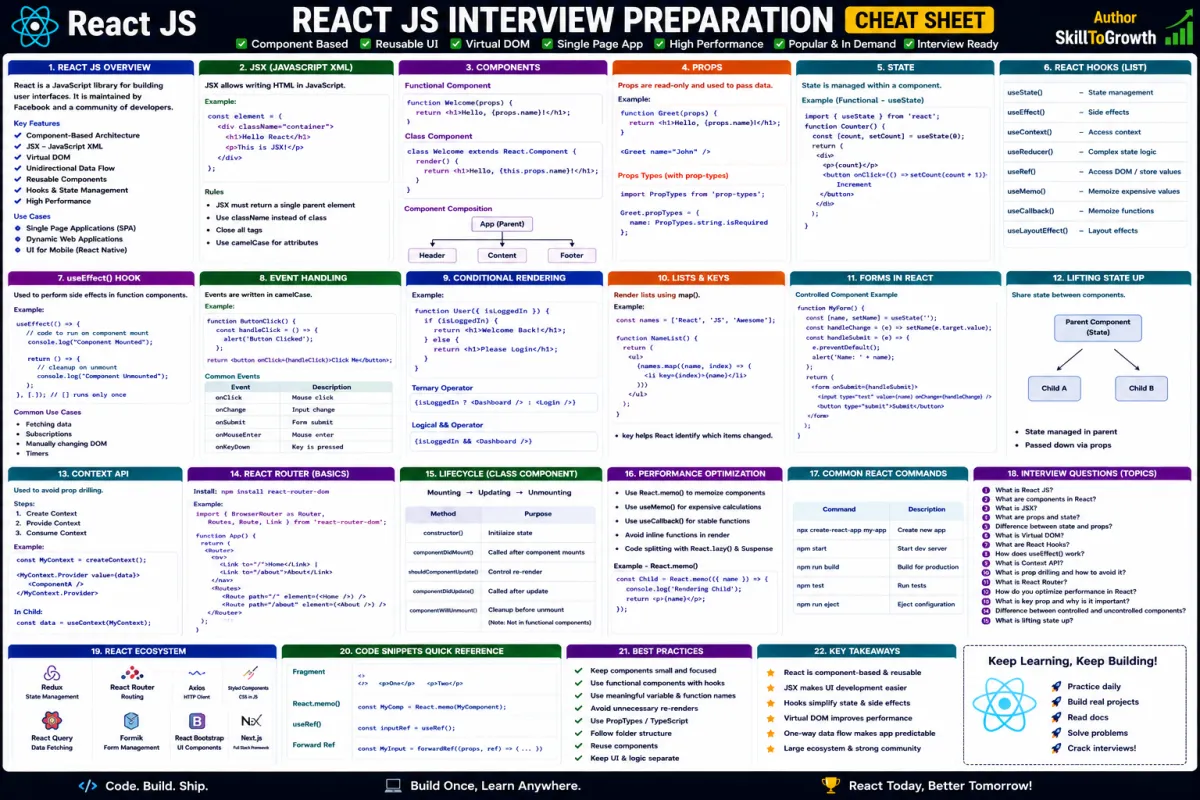
Functional Components
Today, Functional Components are the recommended way of building React applications.
A functional component is simply a JavaScript function that returns a React user interface.
Modern React applications primarily use functional components because they are:
🔸 Simple
🔸 Lightweight
🔸 Easy to understand
🔸 Easy to test
🔸 Compatible with React Hooks
🔸 Better suited for modern React development
With the introduction of Hooks, functional components gained the ability to manage state, perform side effects, and handle lifecycle events, making them capable of replacing most traditional class components.
Today, nearly all new React projects are built using functional components.
Class Components
Before React Hooks were introduced, Class Components were the primary way to create stateful components.
Class components provided features such as:
🔸 Internal state
🔸 Lifecycle methods
🔸 Event handling
🔸 Component logic
Although still supported, they are now used less frequently in new projects.
Many existing enterprise applications continue to use class components because they were developed before Hooks became available.
Understanding class components remains valuable because developers often encounter them while maintaining legacy React applications.
However, for new projects, functional components are generally preferred.
Component Lifecycle
Every React component passes through several stages during its existence.
It is created, displayed to the user, updated when data changes, and eventually removed from the application.
This sequence is known as the Component Lifecycle.
Understanding the lifecycle helps developers determine the appropriate time to:
🔸 Load data from APIs
🔸 Initialize application settings
🔸 Register event listeners
🔸 Start timers
🔸 Connect external services
🔸 Update application state
🔸 Release resources
🔸 Clean up background processes
In modern React, lifecycle behavior is commonly managed using Hooks, while older applications often rely on lifecycle methods found in class components.
Understanding the component lifecycle is essential for writing efficient and reliable React applications.
Nested Components
As applications become larger, components frequently contain other components.
This structure is known as Nested Components.
For example, a Product Page may include:
🔸 Product Information
🔸 Image Gallery
🔸 Product Reviews
🔸 Rating Summary
🔸 Related Products
🔸 Add to Cart Section
Each of these may itself contain additional reusable components.
Nested components improve organization by breaking large interfaces into smaller, manageable sections.
However, developers should avoid excessive nesting because deeply nested component trees become more difficult to understand and maintain.
Keeping component hierarchies simple improves readability.
Reusable Components
One of React's greatest strengths is the ability to create reusable components.
Rather than rewriting similar interfaces repeatedly, developers build flexible components that can be used throughout the application.
Common reusable components include:
🔸 Buttons
🔸 Cards
🔸 Tables
🔸 Input Fields
🔸 Navigation Menus
🔸 Dialog Boxes
🔸 Alerts
🔸 Pagination Controls
Reusable components reduce duplicated code while ensuring consistent design across the application.
When business requirements change, developers only need to update the reusable component once instead of modifying every individual page.
This significantly reduces maintenance effort.
Component Composition
React encourages developers to build applications through Component Composition.
Instead of creating one large component that handles every responsibility, multiple smaller components are combined to build more complex interfaces.
For example, a Dashboard component may consist of:
🔸 Sidebar
🔸 Navigation Bar
🔸 Statistics Cards
🔸 Charts
🔸 Recent Activity
🔸 Notifications
🔸 User Profile
Each child component focuses on a single responsibility while contributing to the overall page.
Component composition promotes flexibility, readability, and scalability.
Rather than inheriting functionality, React encourages combining smaller components to create larger application features.
This approach makes applications easier to extend as new requirements emerge.
Choosing the Right Component Structure
Designing effective components requires careful planning.
A good component should perform one specific responsibility rather than combining multiple unrelated features.
For example:
A Product Card should display product information.
It should not also handle authentication, payment processing, order history, and customer support.
Keeping components focused on a single purpose improves readability, testing, and long-term maintainability.
As applications grow, well-designed components remain reusable without requiring significant modifications.
Component Best Practices
Professional React developers follow several best practices when designing components.
Recommended Practices
🔸 Keep components focused on a single responsibility.
🔸 Prefer functional components for new applications.
🔸 Build reusable UI components whenever possible.
🔸 Avoid duplicating user interface code.
🔸 Organize components into logical folders.
🔸 Keep component hierarchies simple.
🔸 Separate presentation from business logic.
🔸 Write meaningful component names.
🔸 Keep components small and maintainable.
🔸 Follow a consistent project structure.
Following these practices results in cleaner, more scalable React applications.
Common Mistakes
Developers beginning React often encounter similar challenges while designing components.
Common Mistakes
🔸 Creating overly large components.
🔸 Mixing multiple responsibilities into one component.
🔸 Repeating similar UI instead of creating reusable components.
🔸 Building deeply nested component trees.
🔸 Using class components unnecessarily in new projects.
🔸 Ignoring component composition.
🔸 Writing business logic directly inside presentation components.
🔸 Using inconsistent component naming conventions.
Recognizing these mistakes early helps developers build applications that remain maintainable as they grow.
Interview Questions
- What is a React component?
- Why are components important in React?
- What is the difference between functional components and class components?
- Why are functional components preferred in modern React development?
- What is the React component lifecycle?
- What are nested components?
- What are reusable components, and why are they important?
- What is component composition in React?
- How should components be organized in large React applications?
- What are the best practices for designing scalable React components?